Short answer: a conversation is one visitor’s chat session with your AI assistant, however many messages it contains. Your plan includes a number of conversations per month. One visitor talking to your assistant for twenty messages costs one conversation, not twenty.
What counts as one conversation #
A visitor arrives on your public request page or opens the chat widget on your site and starts talking. Everything that follows in that session is a single conversation.
It stays one conversation whether they ask two questions or twenty, whether they change the subject halfway through, and whether or not they end up submitting a request.
When a second conversation starts #
If the same visitor comes back after about half an hour of silence, that counts as a new one. The assistant has no live thread to resume at that point, so it is genuinely a fresh exchange.
Coming back within the same sitting does not start a new conversation. Neither does the visitor clicking New conversation in the widget to change the subject — that clears the chat on their screen, but it does not cost you again.
Long conversations and handing over to a person #
A single exchange on one topic has a message limit. When a conversation reaches it, the assistant stops trying and shows the visitor the request form instead, so the question reaches you as a request rather than dying in a chat.
That is deliberate rather than a restriction to work around. A pre-sales conversation that has gone that many turns on one topic without resolving is usually one a person should take over — the visitor is asking something the assistant does not have, and more attempts will not change that.
The visitor can still start a new conversation about something else, and that does not count again.
What you see afterwards #
Conversations appear in your dashboard with their status. How far back you can read them depends on your plan — older transcripts lock once they fall outside your plan’s history window.
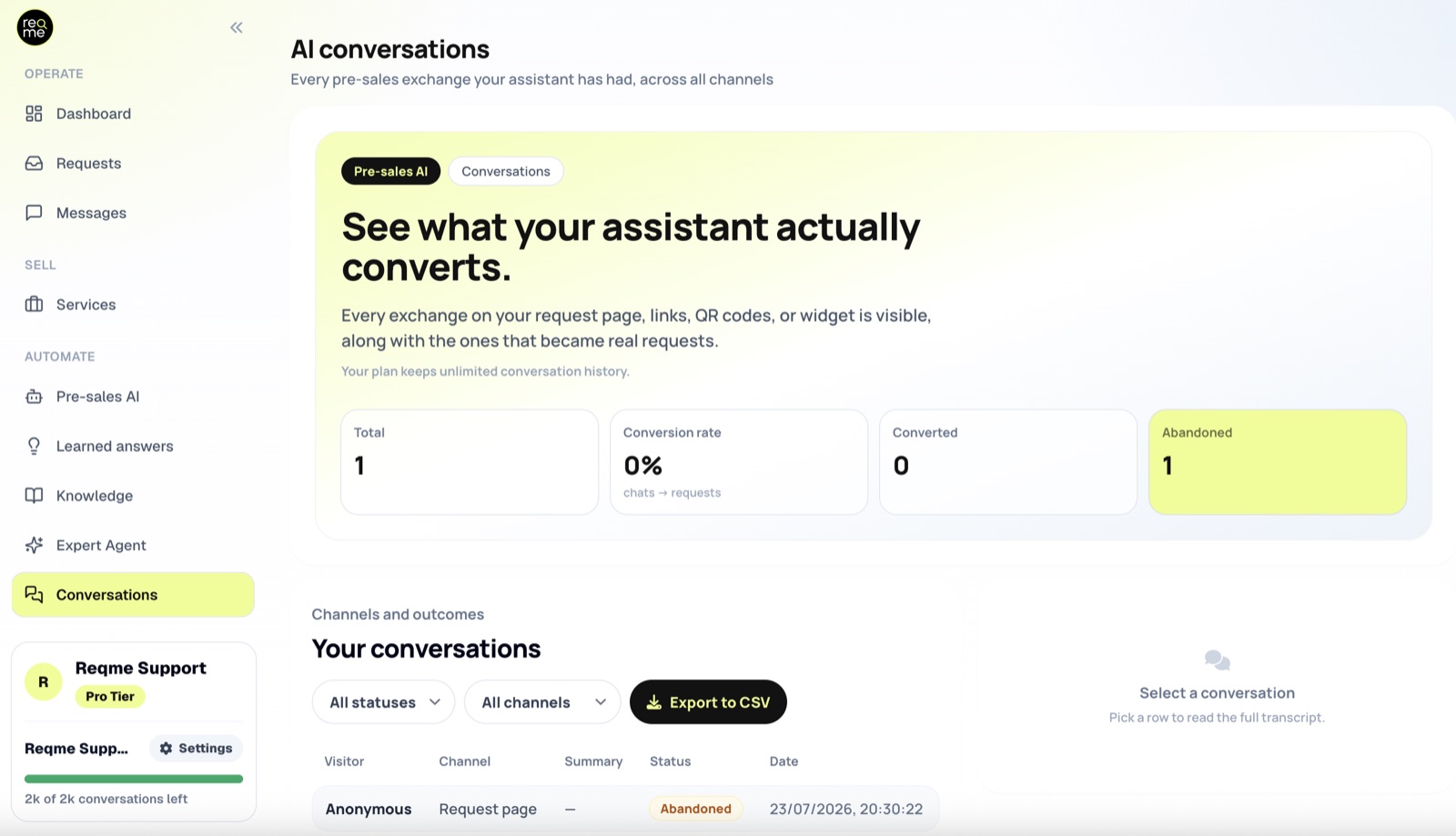
- Active — currently in progress
- Converted — the visitor submitted a request; the conversation is linked to it, so you can read what was discussed before the request arrived
- Abandoned — the visitor stopped replying without submitting anything
Abandoned conversations are worth reading. They are the questions your assistant could not answer well enough to keep someone engaged, and they point directly at what your business context or documents are missing.
Frequently asked questions #
Does a longer chat cost more? #
No. Length does not change the cost — a conversation is a conversation.
Does it still count if the visitor never submits a request? #
Yes. The assistant did the work of answering, whether or not it converted.
What happens when I run out of conversations for the month? #
New visitors stop getting answers until the next period, or until you add more. Extra conversation packs are available on Starter, Business and Pro; on Free the only route is to upgrade. Three things soften that, and they are worth knowing:
- A conversation already in progress is never cut off mid-sentence. The limit applies when a new conversation starts, not to one already running.
- The conversations you could not answer are still recorded, and flagged, so you can see exactly which leads you missed rather than never learning they existed.
- You are notified the first time it happens, rather than discovering it later.
Everything else keeps working normally — your request page, forms, proposals and invoices are unaffected. Only the chat pauses.
Do my own test chats count? #
Yes. If you open your own public page and talk to your assistant, that is a conversation like any other.
Where do I see how many I have used? #
On the Plan & Usage page, and in the live meter at the bottom of the sidebar.
Need help? #
If this page did not answer your question, send it to us. Tell us what you were trying to do and what happened instead — that is usually enough for us to spot the problem straight away.
Prefer email? hi@reqme.co


