Short answer: go to Integrations in your ReqMe workspace and connect one of five payment providers — Stripe, PayPal, Paysera, Monobank or Mollie. Once connected, invoices you send carry a payment link, and your client pays without leaving their browser. You can connect more than one provider and switch between them per invoice.
ReqMe never holds your money. Payments go directly from your client to your own account with the provider you connected; ReqMe only creates the payment request and records when it is paid.
Before you start #
You need an existing account with the provider you want to use. ReqMe does not create one for you. Stripe is the exception in one respect: it can create the connected account as part of the flow, but you still complete Stripe’s own onboarding.
Connecting a provider #
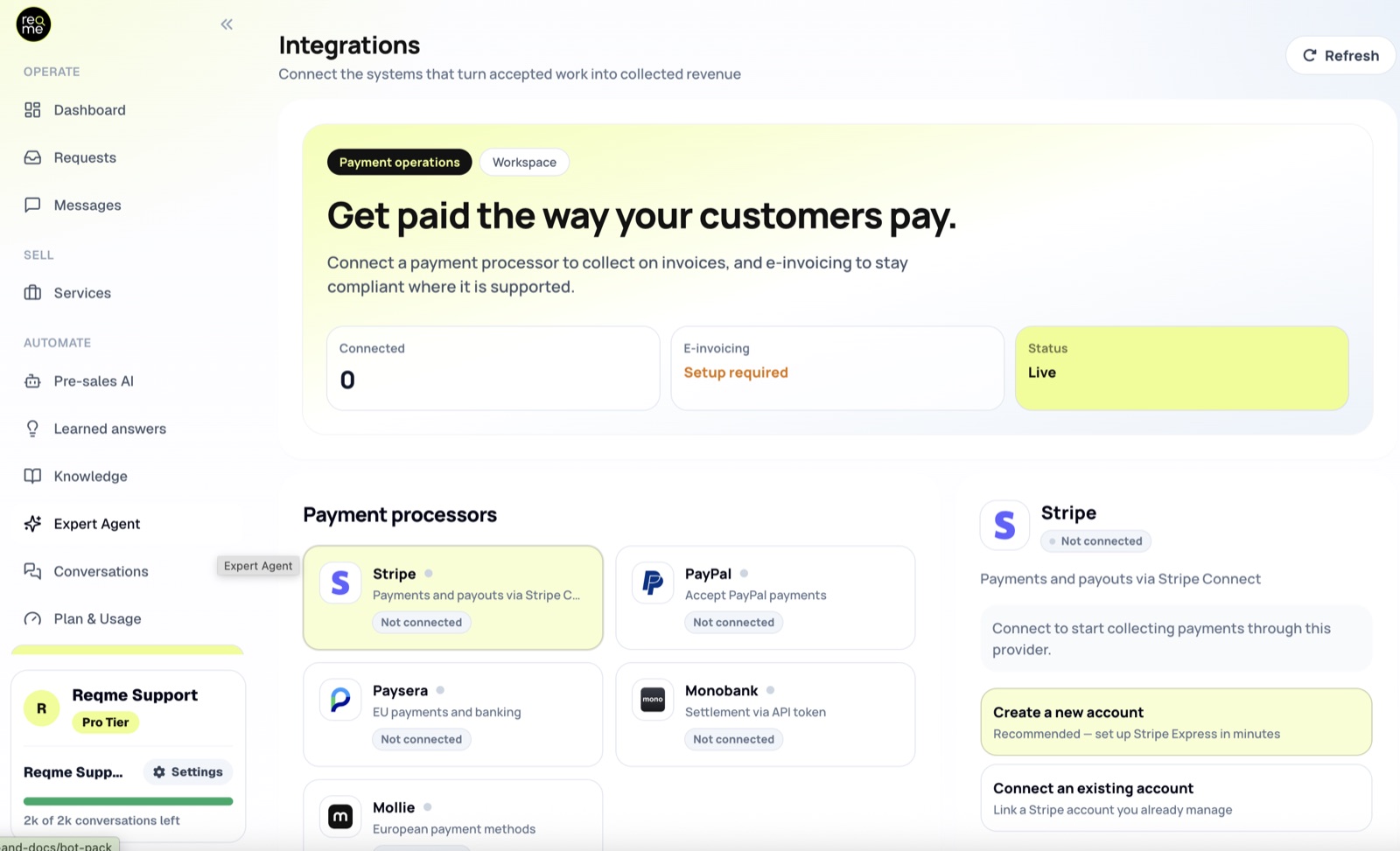
Open Integrations from the workspace menu. Each provider is a card showing whether it is connected. Click the one you want and follow the flow for that provider.
Stripe #
Stripe uses a redirect rather than keys. Click connect and ReqMe sends you to Stripe, where you sign in or create the connected account and complete their onboarding. When Stripe returns you to ReqMe the card shows as connected.
Nothing to copy and paste — you never handle a Stripe secret key.
PayPal #
PayPal asks for credentials from your PayPal developer dashboard:
- Client ID
- Client Secret
- Mode — sandbox for testing, live for real payments
- Webhook ID — required for live mode. Without it ReqMe cannot verify the notifications PayPal sends, so paid invoices will not be marked as paid
Start in sandbox if you want to run a test invoice end to end, then reconnect in live mode when you are satisfied. Sandbox credentials will not take real payments.
Paysera #
Paysera asks for three values from your Paysera project:
- Project ID
- Client ID
- Client Secret
All three are required; the form will not submit with any of them blank.
Monobank #
Monobank asks for a single API token, which you generate in your Monobank merchant account. Paste it into the form and connect.
Mollie #
Mollie asks for an API key. Mollie keys begin with test_ or live_, and ReqMe checks that prefix before accepting the key — if you see an error about the key format, you have most likely pasted a different value from the Mollie dashboard, such as a profile ID.
As with PayPal, a test_ key lets you walk the whole flow without moving real money.
Using more than one provider #
ReqMe stores one connection per provider, so you can have Stripe and Mollie and Monobank all connected at the same time. That is useful when you invoice clients in different countries and want each to pay by the method that is normal for them.
Checking that it worked #
The provider card on the Integrations page shows its current status. A connected card also shows non-secret details such as the account or project identifier and the date it was connected. Secrets are never displayed back to you after saving.
The most reliable check is an end-to-end one: create a small invoice, send it to yourself, and pay it with a test key or a small real amount. That exercises the same path a client will take, including the webhook that marks the invoice paid.
Disconnecting or replacing a provider #
Use disconnect on the provider card. ReqMe asks you to confirm, because invoices that have already been sent with a payment link from that provider will no longer be payable through it.
To rotate credentials — for example moving PayPal from sandbox to live, or replacing a leaked Mollie key — disconnect and connect again with the new values.
Frequently asked questions #
Does ReqMe hold my clients’ payments? #
No. Money moves from your client to your own account with the provider. ReqMe is not a payment institution and does not act as an escrow agent. Each provider processes payment data under its own terms.
Do I have to use Stripe? #
No. Stripe is one of five options. PayPal, Paysera, Monobank and Mollie are all first-class integrations, and none of them requires a Stripe account.
Can I test before taking real payments? #
Yes, with PayPal (sandbox mode) and Mollie (a test_ key). Send yourself an invoice and pay it to see the whole flow, including the invoice being marked as paid.
Where do my clients enter their card details? #
On the provider’s own hosted page, not in ReqMe. Card numbers never pass through ReqMe.
What happens if I disconnect a provider with unpaid invoices outstanding? #
Those invoices lose the payment link that was created through that provider. Reconnect it, or issue the invoice again through another connected provider.
Need help? #
If this page did not answer your question, send it to us. Tell us what you were trying to do and what happened instead — that is usually enough for us to spot the problem straight away.
Prefer email? hi@reqme.co


