Short answer: your plan, what it includes, and your ReqMe invoices all live in Settings. Changing plan, updating your card and downloading receipts happen through the billing portal, which opens from there.
What your plan includes #
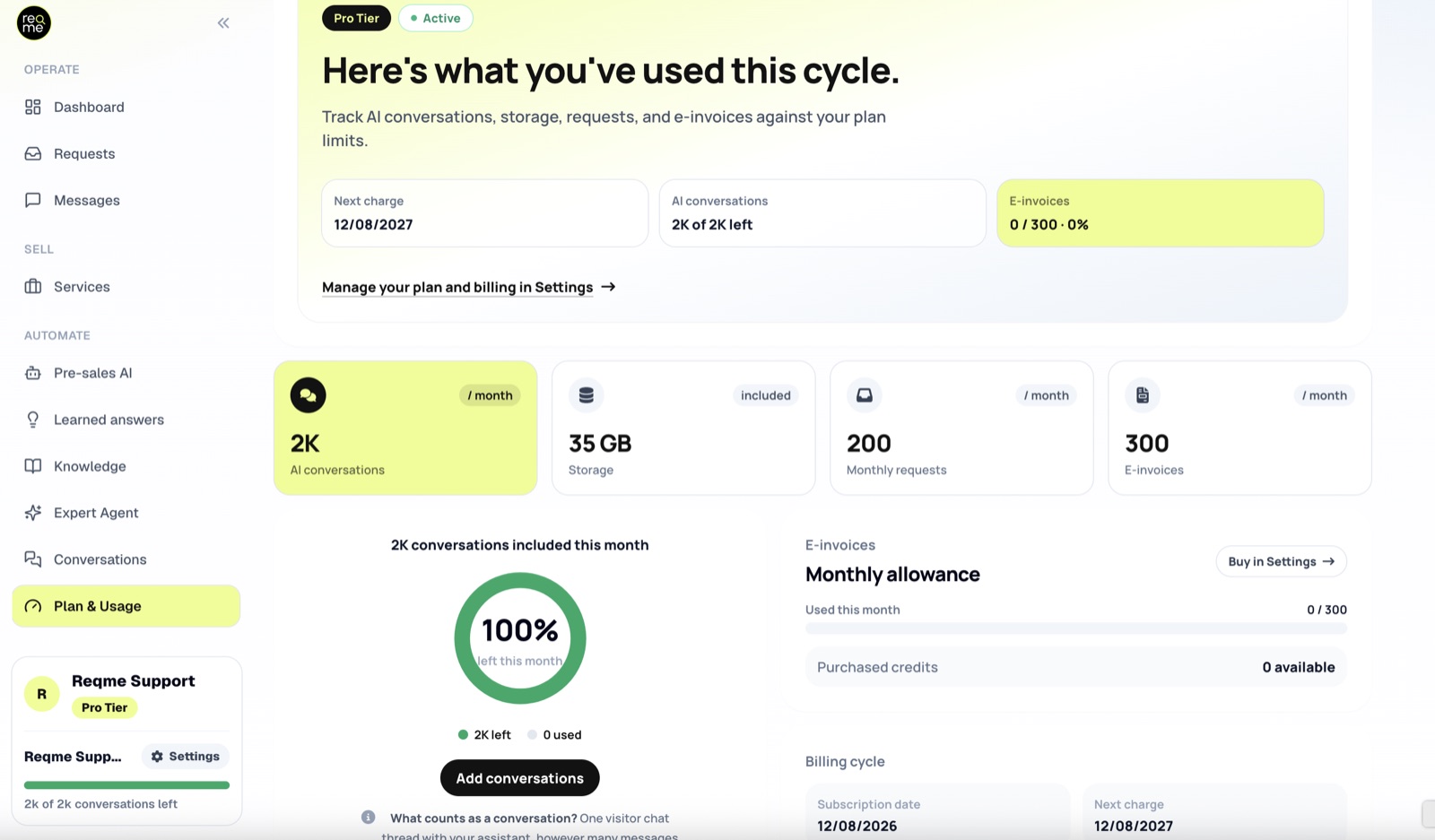
Your subscription covers the product itself and a number of AI conversations per period. Two things are metered: AI conversations and requests. Proposals, contracts, invoices and deliverables are not counted or capped. Your plan includes a monthly number of requests, and once you reach it further requests are held behind the limit instead of arriving in your inbox — the dashboard tells you how many are waiting. Plan & Usage shows both allowances against your plan.
If you are unsure what a conversation is, that is covered separately in What counts as a conversation.
Seeing where you stand #
Settings shows your current plan and when it next renews. Plan & Usage is where you see how much of your conversation and request allowances you have used. It is worth glancing at mid-period rather than discovering the position at the end.
Changing plan #
Open Settings and choose a different plan. Moving up takes effect so you can keep working; moving down applies from your next period.
Pick the plan by how many conversations you actually use, not by feature count. Most people either sit comfortably inside their allowance or run out consistently — a month or two of real usage tells you which.
Running out before the period ends #
On Starter, Business and Pro you can add more conversations without changing plan; on Free the only route is to upgrade. Buying more suits a busy month; changing plan suits a pattern.
A conversation already in progress is never cut off, conversations you could not answer are still recorded so you can see the leads you missed, and you are notified the first time it happens.
Your card, receipts and invoices #
The billing portal handles payment details, past invoices and receipts for your ReqMe subscription. It opens from Settings.
Note the distinction: invoices you send clients live in your requests. Invoices ReqMe sends you live in the billing portal. They are different things and different places.
E-invoice credits #
If you use Peppol e-invoicing, sending electronic invoices draws on a separate balance from your conversation allowance, and can be topped up from Settings. Ordinary invoices are unaffected.
Cancelling #
Cancel from the billing portal. Your account stays active to the end of the period you have paid for, and your data is not deleted the moment you cancel.
Before you go: if something specific is not working for you, it is worth telling us — several things people cancel over are either configurable or already on the way.
Frequently asked questions #
Do unused conversations roll over? #
No. The allowance is per period.
Does a request, proposal or invoice cost anything? #
Proposals, contracts, invoices and deliverables cost nothing. Requests, however, are counted against a monthly allowance, so that number is worth watching alongside your conversations.
Where do I get an invoice for my ReqMe subscription? #
The billing portal, opened from Settings.
Can I change plan mid-period? #
Yes. Upgrades apply so you can carry on; downgrades apply from the next period.
Something about my billing looks wrong. #
Get in touch rather than guessing — hi@reqme.co, or send us a support request.
Need help? #
If this page did not answer your question, send it to us. Tell us what you were trying to do and what happened instead — that is usually enough for us to spot the problem straight away.
Prefer email? hi@reqme.co


